
Telegram Messenger is a cloud-based messaging app used for private chats, large group discussions, public channels, file sharing, and voice and video calls. It has become one of the world’s most widely used messaging platforms. Part of its appeal comes from features such as very large groups, unlimited-subscriber channels, flexible file sharing, and multi-device access.
That flexibility comes with tradeoffs. Telegram is useful for communities, file sharing, and accessing chats across several devices, but its privacy and encryption model works differently from what some users expect. Understanding those differences is important before deciding whether Telegram fits your needs.
What is Telegram Messenger?
Telegram is a free messaging app available on phones, tablets, desktop computers, and web browsers. Regular conversations, known as Cloud Chats, are stored in Telegram’s cloud. This allows your chat history, media, and settings to appear across devices when you log in.
Beyond one-on-one messaging, Telegram supports groups with up to 200,000 members, channels for broadcasting to an unlimited audience, bots for automation, and Mini Apps that run inside Telegram. A Premium subscription adds features such as larger file uploads and an ad-free experience, while the core messaging features remain available for free.
Advantages of Telegram Messenger

Telegram’s main advantages are large-scale group and channel support, generous file sharing, multi-device syncing, and a broad range of bots and customization options.
Large Groups and Unlimited Channels
Basic Telegram groups support smaller communities, while supergroups can scale to 200,000 members. Channels can have an unlimited number of subscribers because they are designed mainly for broadcasting rather than group conversation.
This makes Telegram useful for large communities, public updates, organizations, creators, and audiences that need more room than a typical group chat provides.
Large File Sharing
Free accounts can send files up to 2GB each, while Telegram Premium raises the limit to 4GB per file.
Users can also send photos and videos as files when they want to preserve the original quality rather than use Telegram’s normal media compression.
Multi-Device Access Through Cloud Chats
Regular Cloud Chats are stored in Telegram’s cloud, so the same conversations can be opened on a phone, tablet, desktop app, or web browser. Messages and media stay synchronized across logged-in devices.
This is useful for people who regularly switch between mobile and desktop devices.
Bots, Automation, and Mini Apps
Telegram’s bot platform allows developers to build tools that work directly inside chats. These can range from reminders and moderation bots to customer support tools and other automated services.
Mini Apps expand this further by allowing small applications to run inside Telegram without requiring users to leave the platform.
Usernames Can Reduce Phone Number Exposure
Telegram allows users to create a username so other people can contact them without being given their phone number directly.
Privacy settings also allow users to control who can see their phone number and who can find them using it. The number itself, however, remains linked to the Telegram account.
Secret Chats for Sensitive One-on-One Conversations
Telegram offers Secret Chats for users who need end-to-end encryption. These conversations also support features such as self-destructing messages and restrictions on forwarding.
Secret Chats provide stronger privacy than regular Cloud Chats, but they have important limitations.
Disadvantages of Telegram Messenger
The main disadvantages of Telegram Messenger involve its default encryption model, Secret Chat limitations, phone number requirements, public-community risks, and the complexity that comes with its large number of features.
Regular Cloud Chats Are Not End-to-End Encrypted by Default
Telegram’s standard one-on-one chats and group chats are not end-to-end encrypted.
Cloud Chats are encrypted between your device and Telegram’s servers. Telegram holds the keys needed to decrypt this data, rather than limiting access to only the sender and recipient.
This matters because Telegram is technically capable of accessing the contents of Cloud Chats under applicable legal circumstances. That is different from services such as Signal, which apply end-to-end encryption to conversations by default.
Secret Chats Have Important Limitations
Secret Chats provide end-to-end encryption, but they only work between two people.
They also remain tied to the device where the conversation was started rather than syncing through Telegram’s cloud. This means a Secret Chat will not automatically appear on another phone, tablet, or desktop device.
That tradeoff improves privacy but reduces the multi-device convenience available with normal Telegram chats.
Your Phone Number Remains Linked to Your Account
Telegram allows users to hide their phone number from other users through its Privacy and Security settings. Visibility can be restricted, and users can separately control who can find them through their number.
Even when the number is hidden from other users, it remains associated with the account on Telegram’s side.
Telegram’s Data-Sharing Policy Has Changed
Telegram’s policy on sharing account information with authorities changed in September 2024.
Its privacy policy states that an IP address and phone number may be disclosed to relevant authorities in response to a valid judicial order when a user is suspected of activity that violates Telegram’s Terms of Service.
This is broader than Telegram’s older policy, which focused on terrorism-related cases. Users who chose Telegram based on its earlier approach to law-enforcement requests should be aware of that change.
An IP address does not normally identify a person on its own, but it can still reveal useful network and location information. You can read more about what an IP address can reveal.
Large Public Communities Can Attract Spam and Scams
Telegram’s open groups and channels make it easy to build large communities, but that openness also attracts spam bots, impersonation accounts, scams, misleading links, and low-quality content.
Telegram gives administrators tools such as slow mode, join requests, permission controls, reporting, and moderation bots. These tools can help, but large communities still require active moderation.
Users should also be cautious when joining public channels because creating a channel does not guarantee the accuracy or reliability of its content.
The Number of Features Can Feel Overwhelming
Telegram includes folders, multiple chat types, bots, Mini Apps, channels, groups, privacy controls, and many customization options.
Power users may value that flexibility, but someone who only wants a simple app for messaging friends and family may find the interface and settings more complex than necessary.
Active Groups Can Create Notification Overload
Large groups and busy channels may produce a constant stream of notifications.
Telegram provides per-chat notification controls and mute options, so the problem is manageable. Users who join many active communities may still need to adjust these settings manually.
Telegram Cloud Chats vs Secret Chats
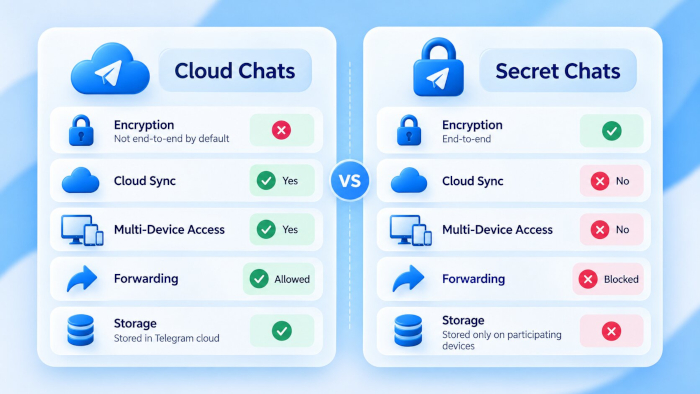
Understanding the difference between Cloud Chats and Secret Chats is important because they use different privacy models.
Cloud Chats are the default for regular one-on-one conversations and group chats. Messages are encrypted between your device and Telegram’s servers using Telegram’s MTProto protocol. They are stored in Telegram’s cloud so you can access them from your other logged-in devices.
Telegram holds the keys required to decrypt Cloud Chat data.
Secret Chats use end-to-end encryption so only the two devices participating in the conversation can read the messages. They do not have a cloud copy and do not sync to other devices.
Messages from Secret Chats also cannot be forwarded. If you lose access to the device where the Secret Chat was created, the conversation will not automatically appear on a replacement device.
The practical difference is simple. Cloud Chats prioritize synchronization and convenience, while Secret Chats prioritize stronger privacy at the cost of multi-device access.
Telegram Advantages and Disadvantages at a Glance
| Feature or Issue | Advantage | Possible Disadvantage |
|---|---|---|
| Group size | Supergroups support up to 200,000 members | Large groups are harder to moderate and attract more spam |
| File sharing | 2GB per file free, 4GB with Premium | Media sent normally is compressed unless sent as a file |
| Encryption | Secret Chats use real end-to-end encryption | Regular Cloud Chats are not end-to-end encrypted |
| Device access | Cloud Chats sync across unlimited devices | Secret Chats stay on one device and don't sync |
| Phone number | Can be hidden from other users in settings | Still tied to your account on Telegram's side |
| Cost | Full core app is free with no subscription required | Premium features and an ad-free experience cost extra |
| Community tools | Bots, admin controls, and Mini Apps support big communities | Feature depth can feel complex for casual users |
| Public content | Channels make discovery and broadcasting easy | Open discovery also surfaces scams and low-quality content |
Is Telegram Safe and Private?
Telegram can be secure and private, but the answer depends on the type of chat you use and the level of privacy you expect.
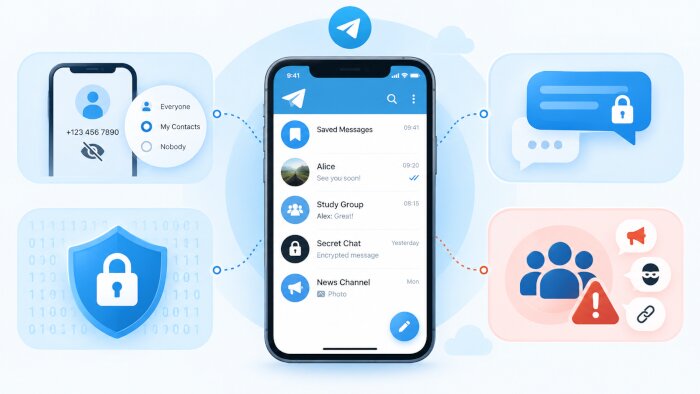
A regular Cloud Chat is encrypted between your device and Telegram’s servers, but it is not end-to-end encrypted. Telegram can technically access that data because it holds the required decryption keys.
A Secret Chat is end-to-end encrypted and provides stronger privacy, but it is limited to one-on-one conversations and does not sync across devices. Telegram does not currently provide the same Secret Chat model for group conversations.
Your settings and behavior also matter. Hiding your phone number, reviewing who can find you, managing contact syncing, and understanding the difference between Cloud Chats and Secret Chats can reduce unnecessary exposure.
If your main priority is end-to-end encryption by default for every conversation, Signal uses a different approach by applying it automatically to chats, including groups. Telegram offers stronger tools for large communities, channels, bots, and file sharing, but its default privacy model is different.
Who Should Use Telegram?
Telegram is particularly useful for:
- Communities and public groups that need support for large numbers of members
- Channel owners who want to broadcast updates to a large audience
- People who regularly share large files
- Users who switch between phones, tablets, and desktop computers
- Community managers who use bots, automation, or Mini Apps
Telegram may be less suitable for someone whose main requirement is end-to-end encryption for every conversation without choosing a separate chat type.
For sensitive one-on-one communication, Telegram users need to start a Secret Chat rather than rely on the default Cloud Chat.
Is Telegram Messenger Right for You?
Telegram is strongest as a flexible messaging and community platform. Its large groups, channels, file sharing, bots, and multi-device syncing make it useful for far more than simple one-on-one messaging.
Its biggest limitation is that regular chats are not end-to-end encrypted by default. Users who need stronger privacy should understand the difference between Cloud Chats and Secret Chats rather than assume every Telegram conversation uses the same encryption model.
For everyday chatting, communities, channels, and file sharing, Telegram offers a broad set of useful features. For communication where default end-to-end encryption is the main priority, another messaging service may be a better fit.
Frequently Asked Questions
What Are the Disadvantages of Telegram Messenger?
The main disadvantages of Telegram Messenger are that regular Cloud Chats are not end-to-end encrypted, Secret Chats only work between two people and do not sync across devices, phone numbers remain linked to accounts, and large public communities can attract spam and scams.
What Are the Advantages of Telegram Messenger?
Telegram supports groups with up to 200,000 members, unlimited-subscriber channels, large file uploads, multi-device syncing, bots, Mini Apps, usernames, and flexible community-management tools.
Is Telegram Safer Than Other Messaging Apps?
It depends on the app and the type of conversation. Telegram’s Secret Chats use end-to-end encryption, but regular chats and group chats do not. Some messaging apps apply end-to-end encryption to conversations by default.
Are All Telegram Messages End-to-End Encrypted?
No. Only Secret Chats use end-to-end encryption. Regular one-on-one chats and group chats use Telegram’s Cloud Chat system.
What is the Difference Between Telegram Cloud Chats and Secret Chats?
Cloud Chats are stored in Telegram’s cloud and sync across devices. Secret Chats are end-to-end encrypted, limited to two people, and remain on the devices involved in the conversation.
Can Telegram Be Used on Multiple Devices?
Yes. Cloud Chats can be accessed across multiple logged-in devices. Secret Chats are the exception and do not sync to other devices.
Does Telegram Show Your Phone Number to Everyone?
No. Telegram allows you to restrict who can see your phone number through Privacy and Security settings. Your number still remains linked to your Telegram account.
Is Telegram Free to Use?
Yes. Telegram’s core messaging features, groups, channels, calls, and standard file sharing are available for free. Telegram Premium is optional and adds extra features.
Does Telegram Have Ads?
Yes, but Telegram does not place them inside personal chats. Its official advertising system displays sponsored messages in eligible public channels. Telegram Premium subscribers receive an ad-free experience.

