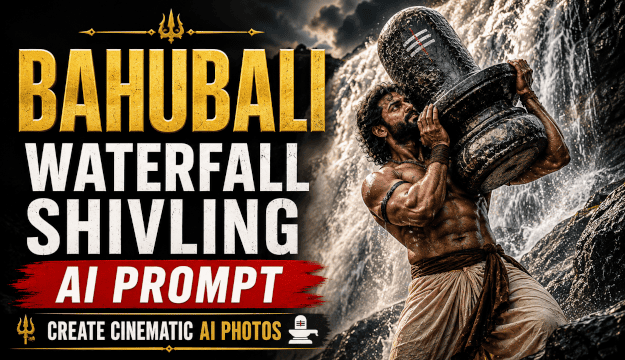
The Bahubali waterfall and Shivling scene has become a popular idea for cinematic AI photo edits. With the right prompt, you can turn your own photo into a dramatic warrior-style portrait featuring a massive Shivling, a towering waterfall, wet rocks, mist, and realistic cinematic lighting.
If you are searching for a prompt for the Bahubali climbing with Shivling on the waterfall look, this guide gives you a detailed ready-to-use prompt along with 12 variations for different poses, moods, and photo styles. You will also learn how to use your reference photo, improve realism, and create a result that looks more like a carefully photographed cinematic scene than a generic AI image.
The Main Bahubali Waterfall Shivling AI Prompt
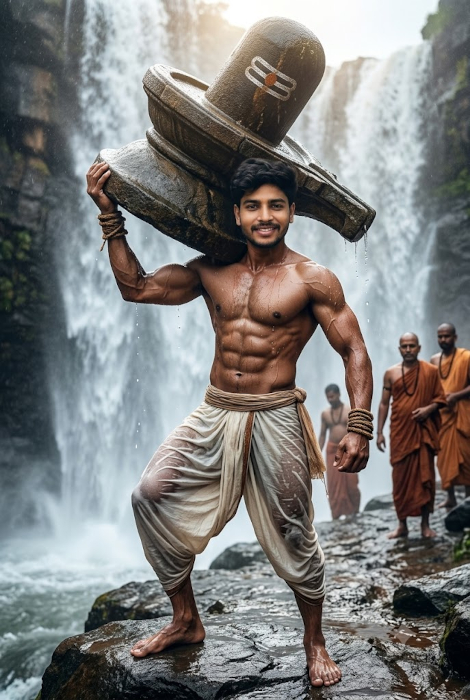
This is the core prompt behind the trend: a single subject, photographed from a low, heroic angle, carrying or bracing a massive stone Shivling against a dramatic waterfall. The goal isn’t to replace your face or body with a generic character, it’s to keep your actual features intact while restyling the clothing, setting, lighting, and physique around you. Copy the prompt below, paste it into your AI photo tool, and attach your reference photo.
PromptUse the uploaded photo as the exact reference for the subject’s face. Keep the facial structure, eyes, nose, jawline, skin tone, and natural expression fully recognizable and consistent with the uploaded photo, do not replace or generalize the face. Reshape the body into a powerful, heroic physique with defined shoulders, arms, and a muscular back, while keeping the head and facial proportions matched to the original photo. Dress the subject in traditional warrior clothing: a wrapped cotton dhoti tied at the waist, a braided leather or cloth armband, and simple rope or cloth wrist wraps, no shirt, bare feet firmly planted on wet rock. Position a massive, weathered stone Shivling resting naturally against the subject’s shoulder and upper back, both arms braced under and around it as if genuinely bearing its full weight, muscles visibly straining, veins and tendons defined under realistic skin texture. Set the scene on a wet, moss-streaked rock ledge partway up a tall waterfall, with a powerful sheet of water crashing down just behind the subject, fine spray drifting across the frame, and soft atmospheric mist blurring the far background. Light the scene with a single dramatic source from above and slightly behind, like breaking sunlight through cloud cover, casting deep, realistic shadows across the chest and rock, with a soft rim light along the shoulders and the edge of the Shivling. Render the wet cotton dhoti with real fabric folds and clinging texture, skin with visible pores, water droplets, and natural sheen rather than a smooth or plastic finish. Compose the image as a vertical, movie-poster style portrait, camera angled slightly upward for a heroic feel, shallow depth of field with the waterfall softly blurred behind a sharply focused subject, strong sense of scale between the person, the Shivling, and the falls. Photorealistic result, no cartoon or painterly style, no text or watermark.
12 Bahubali AI Prompts to Try
Each of these Bahubali photo editing prompts is built for a different pose, mood, or platform. They’re genuinely different from each other, not the same prompt with a word or two swapped.
1. Classic Bahubali Waterfall Shivling Prompt
A straightforward, dependable version close to the original viral look. Good as a first attempt before trying anything more dramatic.
PromptKeep the subject’s face, skin tone, and expression matched exactly to the uploaded reference photo. Build a strong, well-defined physique wrapped in a simple dhoti, standing at the base of a roaring waterfall with a large stone Shivling held against one shoulder. Wet rocks, visible mist, mid-morning sunlight breaking through cloud, camera at eye level, three-quarter body framing, photorealistic skin and fabric texture, vertical portrait orientation.
Best for: A dependable first try before exploring more dramatic variations.
2. Bahubali Carrying the Shivling Prompt
This one focuses purely on the act of carrying: a full weight-bearing pose, with less waterfall drama and more emphasis on visible strength.
PromptMatch the subject’s face precisely to the uploaded photo. Show the subject mid-stride on a rocky incline, both arms wrapped fully around a massive stone Shivling carried against the chest and shoulder, back and leg muscles visibly engaged under strain, dhoti tied high for movement, bare feet gripping wet stone. Waterfall visible but slightly out of focus in the background, overcast lighting for even, soft shadows, camera positioned slightly below eye level, medium shot, photorealistic texture on skin and stone.
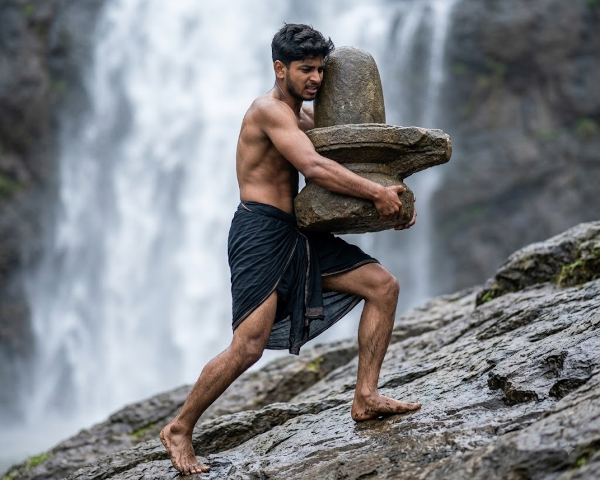
Best for: Showing physical effort and motion rather than a static pose.
3. Bahubali Climbing the Waterfall With Shivling
PromptUse the uploaded photo as the facial reference and keep the person’s recognizable facial features, skin tone, hairstyle, and natural identity consistent. Transform the subject into a powerful warrior climbing a towering waterfall. Show the subject gripping wet rock with both hands while carrying a large weathered stone Shivling securely against the upper back and shoulder. One foot should be firmly planted on a narrow rock ledge while the other pushes upward, creating a believable climbing pose. Water should cascade heavily around the subject, with realistic spray, wet stone, moss, and atmospheric mist. Use a dramatic low-angle camera looking upward to emphasize the height of the waterfall and the scale of the Shivling. Add natural directional light breaking through the clouds, realistic skin and fabric texture, believable water droplets, detailed shadows, and strong depth. Create a vertical cinematic composition with a photorealistic finish, natural proportions, and no cartoon or painterly effects.
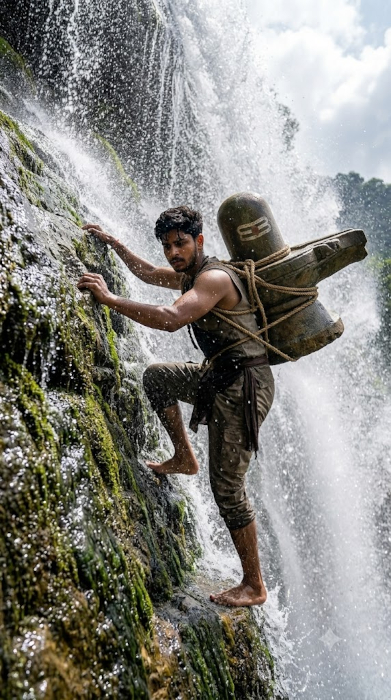
Best for: Recreating the dramatic waterfall-climbing concept from a personal photo.
4. Bahubali Warrior Portrait Prompt
A closer, portrait-focused crop with less waterfall and more character study.
PromptPreserve the exact facial identity from the uploaded photo, including expression and skin tone. Frame a close chest-up portrait of the subject in traditional warrior styling, with a large weathered Shivling partially visible over one shoulder and the waterfall softly blurred in the background. Add subtle water droplets on the skin and hair, warm directional light from one side, and a calm but intense expression. Use shallow depth of field, realistic skin texture, natural shadows, and cinematic photorealism.
Best for: Profile pictures or close-up character shots.
5. Bahubali Movie Poster Prompt
A full cinematic poster layout with title-safe space and a dramatic sky.
PromptMatch the subject’s face exactly to the uploaded photo. Compose a full vertical movie poster style image: the subject centered low in frame holding a massive Shivling overhead with both arms extended, waterfall thundering behind, storm clouds and a streak of sunlight breaking through above, empty negative space at the top third of the frame for potential title text, warrior clothing with a flowing cloth sash caught mid-motion by wind, dramatic underlighting from the churning water below, photorealistic rendering with heightened but believable contrast.
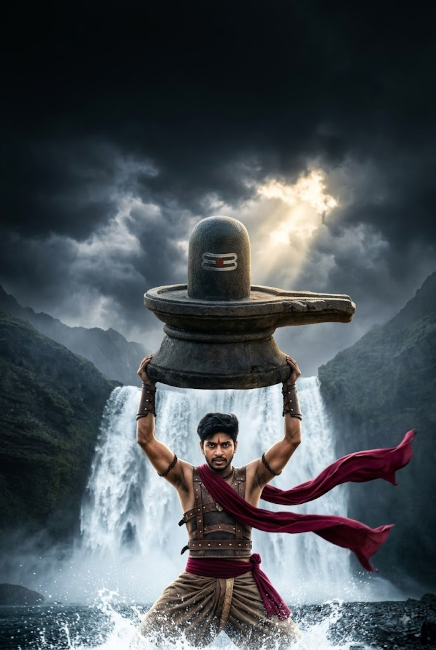
Best for: Creating a shareable, poster-style hero image.
6. Bahubali Prompt for Men
A classic male-presenting variant with a broad, powerful build.
PromptUse the uploaded photo as the exact facial reference. Build a broad-shouldered, muscular male physique, dhoti tied traditionally at the waist, simple metal armband on one bicep, standing firm on wet rock with a large stone Shivling balanced against the chest and one shoulder, arms fully engaged. Waterfall crashing behind at a slight angle, cool blue-toned lighting with a warm highlight on the skin, camera at a low three-quarter angle, photorealistic muscle and skin detail, vertical portrait format.
Best for: A classic heroic look for a male subject.
7. Bahubali Prompt for Women
The same core concept adapted with strength and grace, not a generic reskin.
PromptMatch the subject’s face and features exactly to the uploaded photo. Build a strong, athletic female physique, draped in a wrapped warrior-style garment with a fitted bodice and layered fabric at the waist, arms wrapped securely around a large stone Shivling held against the shoulder, standing on wet rock with the waterfall behind. Determined, focused expression, soft late-afternoon backlight creating a glowing rim around the hair and shoulders, camera at eye level, three-quarter body framing, photorealistic skin and fabric texture, vertical portrait orientation.
Best for: A powerful, respectful female-presenting version of the concept.
8. Bahubali Couple Prompt
Two subjects sharing the effort, useful for couple or friend photos.
PromptUse the two uploaded photos as exact facial references for each person, keeping both faces clearly recognizable. Position both subjects side by side on a wide rock ledge, each bracing one side of a single large stone Shivling between them, both in traditional warrior dress, waterfall spanning the full background behind them. Even, soft overcast lighting, camera at eye level capturing both subjects fully, wide horizontal or vertical framing depending on the reference photos, photorealistic skin and fabric detail on both figures.
Best for: Couples or duo photos who want to share the same scene.
9. Bahubali Sunset Waterfall Prompt
A warm, golden-hour variant for a softer, more romantic mood.
PromptMatch the subject’s face precisely to the uploaded photo. Place the subject on a rock ledge at the base of a waterfall during golden hour, warm orange and pink light reflecting off the water spray, a large stone Shivling held against the shoulder, dhoti and skin catching warm highlights, cooler shadow tones in the rock behind. Camera at a slightly low angle, medium-wide shot, soft lens flare from the setting sun, photorealistic lighting and water detail, vertical portrait composition.
Best for: A warmer, more cinematic and romantic tone.
10. Bahubali Monsoon Waterfall Prompt
Heavier rain, a darker sky, and more turbulent water for maximum drama.
PromptKeep the subject’s facial identity exactly matched to the uploaded photo. Set the scene during a monsoon downpour, heavy rain visible in the air, the waterfall swollen and thunderous, dark grey storm clouds overhead, the subject gripping a large stone Shivling against the chest while rain streams down the skin and soaked dhoti clings to the body. Cool, desaturated color grade except for warm skin tones, camera angled low, strong directional light breaking briefly through the clouds, photorealistic wet texture throughout, vertical framing.
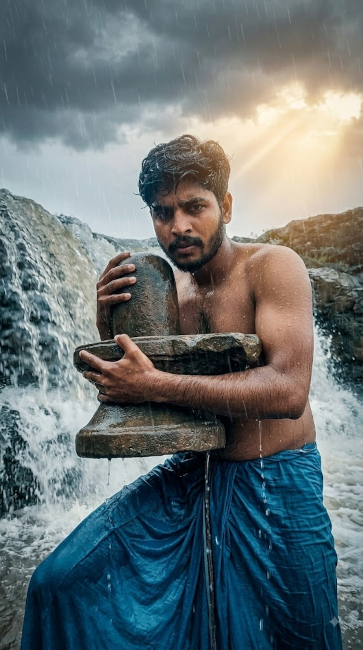
Best for: A darker, more intense and stormy atmosphere.
11. Black-and-Gold Bahubali Warrior Prompt
A stylized but still photorealistic color palette for a more graphic, editorial feel.
PromptPreserve the subject’s exact facial features from the uploaded photo. Style the clothing in deep black fabric with gold thread detailing along the dhoti hem and a gold armband, the stone Shivling carrying subtle warm gold highlights from the lighting rather than its natural grey tone, waterfall rendered in cooler blue-black tones for contrast. Single strong overhead light source, deep shadows, high but realistic contrast, camera at eye level, tight three-quarter framing, photorealistic skin and fabric texture, vertical portrait format.
Best for: A striking, editorial or print-style visual.
12. Bahubali Instagram Portrait Prompt
Optimized for a square or 4:5 social crop with a cleaner, less busy background.
PromptMatch the subject’s face and expression exactly to the uploaded photo. Frame a waist-up portrait with the subject holding a moderately sized stone Shivling against one shoulder, waterfall visible but softened and cropped tighter behind, less spray and mist than a wide shot, warm and even lighting suited for a phone screen, camera at eye level, square or 4:5 vertical crop, photorealistic skin texture, clean and simple composition without heavy shadow.
Best for: Instagram feed posts, reels covers, and social media posts.
What Is the Bahubali Shivling Waterfall Scene?
The waterfall sequence is one of the most recognizable visual moments from Baahubali: The Beginning. The scene combines a towering waterfall, a powerful figure, a sacred Shivling, and a dramatic display of physical strength. That combination of scale, water, rock, and cinematic composition is also what makes the scene work so well as inspiration for AI photo edits.
For AI image generation, the key visual elements are the waterfall, the Shivling, the climbing or weight-bearing pose, wet rocks, mist, dramatic lighting, and a strong sense of scale. These details help create a more convincing cinematic image instead of simply asking an AI tool to “make a Bahubali photo.”
How to Use These Bahubali AI Prompts
- Choose a clear reference photo. Pick a photo where your face is well-lit, in focus, and facing mostly forward. Good lighting on your face matters more than overall photo quality.
- Upload it to your AI image tool. Upload your reference photo to an AI image-generation or photo-editing tool that supports image references. If you are using Gemini, use the image-upload option available in your version of the tool.
- Copy the prompt. Pick the main prompt above or one of the twelve variations, and paste it exactly as written into the tool’s prompt field.
- Generate the image. Run the prompt and review the result against your reference photo, paying attention to whether the face still looks like you.
- Ask for targeted revisions if needed. If something is off, like the Shivling’s position or the lighting, describe just that one change rather than rewriting the whole prompt from scratch.
How to Get More Realistic Results
Getting a result that looks like a real photograph, rather than an obvious AI edit, comes down to a few habits.
- Use a clear reference photo. Blurry, low-light, or heavily filtered photos give the AI less accurate information to work from.
- Give specific instructions. Vague requests like “make it look cool” produce generic results. Describe exactly what you want.
- Preserve recognizable facial features. Explicitly tell the tool to keep your face, skin tone, and expression matched to the uploaded photo.
- Describe clothing accurately. Mention fabric type, how it’s tied or draped, and how it should react to being wet.
- Specify camera perspective. Low angle, eye level, or slightly elevated all change how heroic or natural the final image feels.
- Describe water and environmental details. Spray, mist, wet rock, and the direction water is falling all add believability.
- Use realistic lighting. Naming a light source and direction, like late afternoon sun from one side, gives the AI something concrete to render.
- Avoid contradictory instructions. Asking for both a soft romantic mood and harsh dramatic shadows in the same prompt can confuse the output.
- Make one change at a time when revising. Adjusting several elements at once makes it harder to tell what actually improved the image.
- Avoid relying on “8K” as a substitute for detail. Naming a resolution doesn’t describe what should look realistic. Describe the actual texture, light, and material instead.
How to Create Your Own Bahubali AI Prompt
If none of the prompts above match exactly what you have in mind, build your own using this formula:
Reference subject + pose + clothing + Shivling + waterfall + environment + lighting + camera angle + mood + realism constraints
For example:Match the subject’s face to the uploaded photo (reference subject), standing with one knee braced against a rock (pose), wearing a simple dhoti with the hem soaked through (clothing), holding a weathered stone Shivling against the shoulder (Shivling), in front of a narrow waterfall dropping into a rocky pool (waterfall), on a misty morning with fog low over the water (environment), lit by soft diffused daylight from above (lighting), camera at eye level with a tight vertical crop (camera angle), calm and focused rather than aggressive (mood), photorealistic skin and fabric texture, no cartoon style (realism constraints).
Frequently Asked Questions
What is the Bahubali waterfall AI prompt?
It’s a text prompt used with AI photo tools to turn a personal photo into a Bahubali style image, showing the subject in warrior clothing carrying or climbing with a Shivling in front of a waterfall.
How do I create a Bahubali AI photo?
Upload a clear reference photo to an AI image tool that supports photo-based editing, paste in one of the prompts from this guide, and generate the image. Revise the prompt if any detail needs adjusting.
How do I create the Bahubali Shivling waterfall image?
Use the main prompt in this guide, or one of the twelve variations, along with a reference photo. The Shivling and waterfall details in the prompt are what create that specific scene.
Can I use my own photo with a Bahubali AI prompt?
If your AI image tool supports uploaded reference photos, you can use your own photo with these prompts. The prompts are written to help preserve recognizable facial features while changing the setting, clothing, pose, and overall visual style.
How do I make a Bahubali AI image look realistic?
Focus on specific, concrete details rather than vague requests: accurate fabric behavior, real light direction, water texture, and instructions to preserve your facial identity from the reference photo.
Can women use a Bahubali AI prompt?
Yes. The Bahubali prompt for women variation above adapts the same concept with different clothing and framing while keeping the same waterfall and Shivling elements.
What is the best prompt for a Bahubali-style photo?
The main prompt at the top of this guide is written to be the most complete and detailed starting point. From there, the twelve variations let you adjust the mood, angle, or setting to match what you want.

